A benefit of an effective database security program is that organizations are better positioned to safeguard against the risks of compromise, and to thwart attacks such as malware and ransomware. Steps to building such a program include following best practices and regulatory requirements. Key initiatives include conducting and reviewing vulnerability assessments, and compliance audits.
Databases typically contain sensitive material such as financial data, personnel information, business intelligence, client information, and more. Organizational secrets were once contained in a locked file cabinet, within secure rooms, or entombed deep within an organization. Access was controlled with a key requiring on-site access, and copying or removing files was difficult at best. Today this information is commonly stored in a database that is connected to a wider network. Configuration errors can inadvertently provide access to a global audience. This practice makes a database a primary target of threat actors. Compromised databases are a common element of most data breaches, resulting in the exfiltration or loss of massive amounts of privileged information.
Information that is collected and stored in a database is important, and safeguarding that data is critical to business continuity. Costs associated with damages, fees, legal considerations and loss of reputation resulting from damaged and corrupt databases can be a financial burden for any organization. Depending on the type of data being stored, many established regulations and standards exist, which reduce the risk that information will be mishandled. Successful implementation means that customer confidence is maintained and organizations avoid costly financial ramifications.
Organizations are obligated to protect sensitive data, and many times comply with laws and regulations regarding the data being stored. To best accomplish this, database teams require vulnerability details which easily identify the most significant vulnerabilities, and provide guidance towards mitigation. The ability to act quickly in mitigating database vulnerabilities requires information to be presented in a manner which focuses on findings that should be prioritized and mitigated first. As a result, vulnerability remediation is more successful, the attack surface is reduced, and efforts can be visually tracked and measured against established goals.
Enumerating and securing your databases across the modern attack surface is especially critical related to 3-Tier Web Applications and AI. Nearly every Web Application has some flavor of database on the backend and internal and cyber criminal usage of GenAI and Agentic AI significantly raise the stakes for data security. GenAI prompts can be tied to your internal data and AI agents can be granted a significant range of autonomy. AI agents can operate constantly and adversaries can leverage low-and-slow attacks via these AI Agents and GenAI prompt-based crescendo attacks to gain access to your sensitive data. In this new world of AI, a strong database security program is not just about checking a box for compliance. It is a fundamental requirement to protect an organization's reputation and ensure AI remains an asset instead of a liability.
Tenable Vulnerability Management provides a risk-based view of your IT, security and compliance posture, allowing database teams to analyze findings, remediate identified risk, track progress, and measure success. Designed with the principles of the Cyber Exposure Lifecycle in mind, this dashboard assists database teams in maintaining a high level of awareness and vigilance. The dashboard is tailored to guide the database team in detecting, predicting, and acting to reduce risk across their entire attack surface. The widgets provide a glance over detected Databases. From supported databases to unsupported databases, and exploitable databases that have been active for a long time, this dashboard allows a Database team prioritize which assets/databases to patch first. The dashboard also includes a database compliance widget that assist database teams by presenting pass/fail compliance results. It is important to note that the severity fields in the widgets can either be based on CVSS or VPR, depending on what the user selected in the settings. The dashboard widgets do not require specific asset list filters to be applied prior to use. However, organizations that have teams that do focus on a specific group of assets will benefit from using custom asset lists. Database teams can visualize findings against database assets within the organization using this method.
Widgets
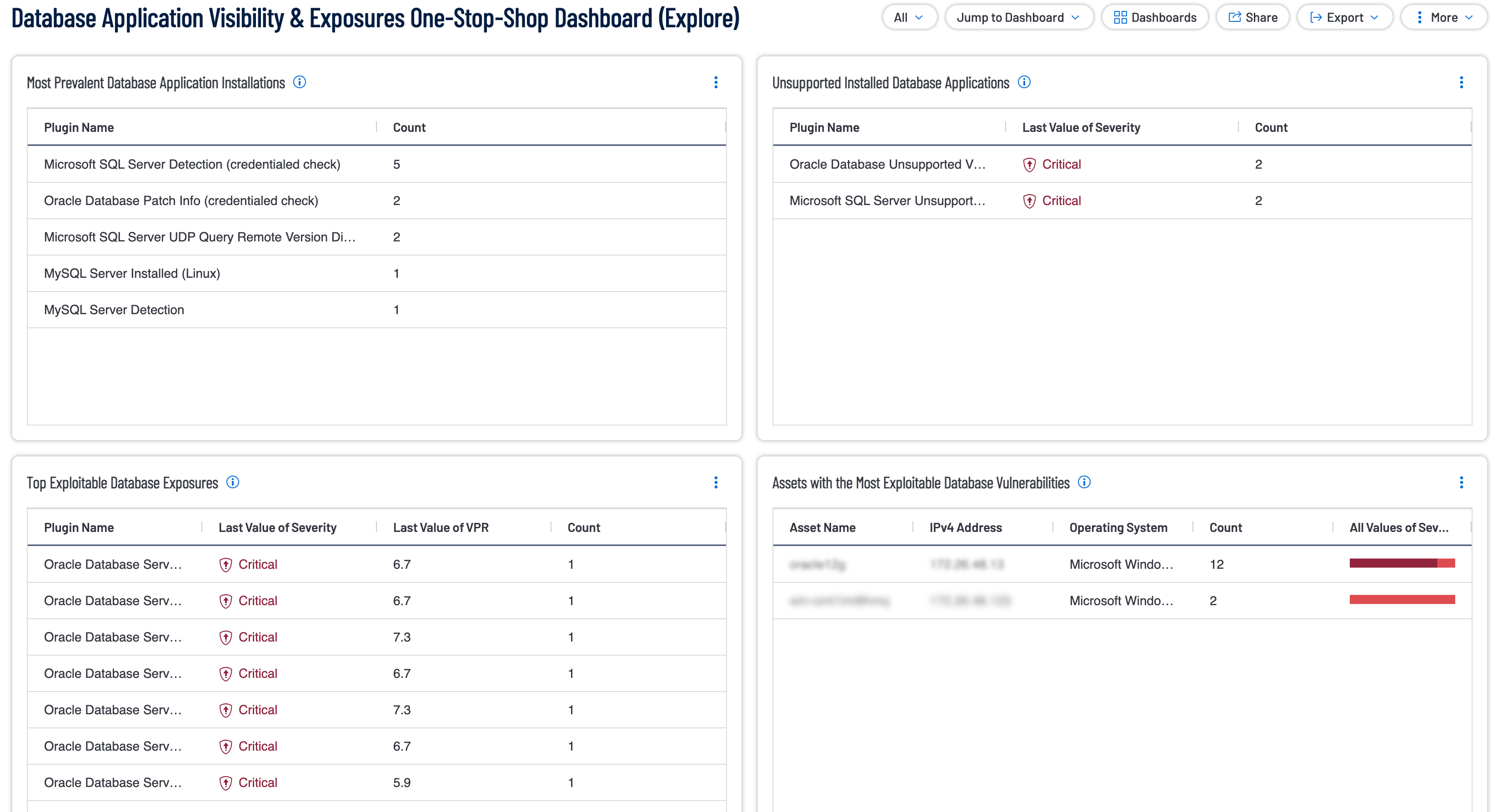
- Most Prevalent Database Application Installations: The following table displays the most prevalent Database applications across your environment enabling the user to have a quick glance at detected databases and their counts. Using the plugin family filter the table only displays databases. The widget is sorted by count allowing the most prevalent databases to be displayed at the top.
- Unsupported Installed Database Applications: The following table displays the most prevalent unsupported Database instances across your environment enabling the user to have a quick glance at detected unsupported databases and their counts. The table utilizes the Plugin Family Filter and the Plugin Name filter to only display unsupported databases. The widget is sorted by count allowing the most prevalent unsupported databases to be displayed at the top.
- Top Exploitable Database Exposures: The following table displays the most prevalent exploitable Database exposures across your environment enabling the user to have a quick glance at detected exploitable databases and their counts. The Table uses the Plugin Family Filter in conjunction with the Exploitability Ease Filter to only display detected exploitable databases. The widget is sorted by count allowing the most prevalent exploitable databases to be displayed at the top.
- Assets with the Most Exploitable Database Vulnerabilities: The following table displays the assets with the most Exploitable database vulnerabilities across your environment enabling the user to have a quick glance at which assets contain exploitable databases and their counts. The Table uses the Plugin Family Filter in conjunction with the Exploitability Ease Filter to only display detected exploitable and group them by asset. The widget is sorted by count allowing the asset with the most exploitable databases to be displayed at the top.
- Database Findings Count by Severity: The following table displays breakout of your Low, Medium, High and Critical Severity Database Vulnerabilities based upon CVSS Severity. Tenable highly recommends that you focus on the Exploitability of Vulnerabilities. Prioritize exploitable vulnerabilities and leverage Tenable's Vulnerabilities Priority Rating (VPR) for vulnerabilities, to understand the current, real-world threat - and prioritize accordingly. Using the plugin family filter the table only displays counts of databases grouped by their severity.
- Other Useful Database Findings: The following table displays additional database assessment findings that you may find useful, including instances of Database credential failures. The widget achieves these results by using the Plugin Family filter to not return any database plugin family findings and the Plugin Name filter to include any plugins that include database in their name. The widget is sorted by count allowing the database related findings which have been detected the most to be displayed at the top.
- Top Active Exploitable Database Vulnerabilities First Seen More Than 365 Days Ago: The following table displays the most prevalent exploitable Database exposures across your environment that are still active, but first seen on assets more than a year ago. By using the First Seen Filter set to the last 365 days, Exploitability Ease filter, Plugin Family filter and the Last seen date Filter set to the last 30 days, this widget can accurately show exploitable databases that require attention. The widget is sorted by count allowing the exploitable database findings which have been detected the most to be displayed at the top.
- Audit Benchmarks Collected using Database Checks: Organizations such as CIS, DISA, and some vendors create golden configurations standards, known as benchmarks. Tenable creates audit files that perform a detailed configuration review. When scanning the appropriate assets with the Database Compliance Check plugin the organization is able to perform detailed configuration checks. This matrix displays the results grouped by the benchmark and provides a quick view into which benchmarks are prevalent in the organization.
Tenable One
Request a demo
The world’s leading AI-powered exposure management platform.
Thank You
Thank you for your interest in Tenable One.
A representative will be in touch soon.
Form ID: 7469
Form Name: one-eval
Form Class: c-form form-panel__global-form c-form--mkto js-mkto-no-css js-form-hanging-label c-form--hide-comments
Form Wrapper ID: one-eval-form-wrapper
Confirmation Class: one-eval-confirmform-modal
Simulate Success